5. Alaska Slope Regional Model
5.1. Overview
This is a description of the AK model
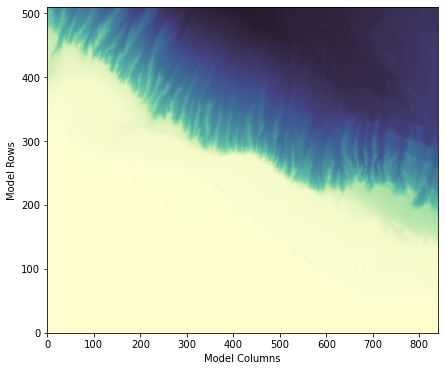
The construction of this model showcases many of the components of the eccoseas package in the downscale and ecco modules.
This model example will showcase the following updates not previously shown in the previous model examples:
Constructing pickup files for regional models given pickups from global models
Working with passive tracers (used for biogeochemical packages)
The functions used in this demo include the tasks in the following list:
Reading and writing pickup files
Interpolating 2D and 3D grids to regional domains
5.1.1. Required ECCO Data
The initial conditions for this model will be generating using existing pickup files from the ECCO-Darwin solution. The list of pertainent files is listed here:
Description |
File(s) |
|---|---|
Physical Variables Pickup |
pickup.0000000001.data, pickup.0000000001.meta |
Seaice Variables Pickup |
pickup_seaice.0000000001.data, pickup_seaice.0000000001.meta |
Darwin Variable Pickup (pH) |
pickup_darwin.0000000001.data, pickup_darwin.0000000001.meta |
Darwin Tracers Pickup |
pickup_ptracers.0000000001.data, pickup_ptracers.0000000001.meta |
In addition to the data above, we also need the grid information. We read this in from the nctiles_grid section of the ECCO Drive:
Description |
File(s) |
|---|---|
Grid description |
tile001.mitgrid, tile002.mitgrid, tile003.mitgrid, tile004.mitgrid, tile005.mitgrid |
Grid angles |
AngleCS.data, - AngleSN.data |
Grid wet masks |
hFacC.data, hFacS.data, hFacW.data |
5.2. Model Grid
5.3. Interpolation Grid
- 5.3.1. Motivation for an Interpolation Grid
- 5.3.2. Constructing the Interpolation Grid
- 5.3.2.1. Step 1: Download the ECCO Files
- 5.3.2.2. Step 2: Read in the ECCO grid
- 5.3.2.3. Step 3: Read in the Regional Model Grid and Mask
- 5.3.2.4. Step 4: Prepare the grids for interpolation
- 5.3.2.5. Step 5: Interpolate the ECCO mask vertically
- 5.3.2.6. Step 6: Reprojecting the Model Grid
- 5.3.2.7. Step 7: Creating the Interpolation Grid
- 5.3.2.8. Step 8: Visualizing the Interpolation Grid
5.4. Initial Conditions
- 5.4.1. Constructing the Initial Conditions
- 5.4.1.1. Step 1: Download the ECCO Files
- 5.4.1.2. Step 2: Read in the Regional Model Grid and Mask
- 5.4.1.3. Step 3: Read in the pickup file and the ECCO grid
- 5.4.1.4. Step 4: Prepare the grids for interpolation
- 5.4.1.5. Step 5: Subset and vertically interpolate the ECCO fields
- 5.4.1.6. Step 6: Interpolate the Physical Fields onto the Model Grid
- 5.4.1.7. Step 7: Plotting the Initial Condition Fields
5.5. Boundary Conditions
- 5.5.1. Constructing the Boundary Conditions